हिंदी
- पहले Bank मैं SBI चुनिए और उसमे login/password सेव करिए
- फिर Bank मैं "Powered by Paytm" चुनिए फिर Netbanking पर क्लिक कर SBI को चुनिए
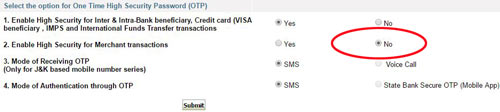
- अपने SBI अकाउंट मैं लॉग इन कर इस ऑप्शन तो चालू कीजिये:
- "Stop in Last Step" को ओन कर अब आप खुद देखें की OTP आता है की नहीं!
- याद रखें एक ही SBI अकाउंट को कई profile मैं इस्तेमाल कर एक ही साथ पेमेंट किया जा सकता है!
- इसको भी जरुर पड़े
English
- First in "Banks" select SBI then save the login/password
- Then select "Powered by Paytm" in Banks then click Netbanking then select SBI bank
- Please turn on this High Security option in SBI account
- You can use "Stop in Last Step" within SBI now
- Remember you can use same SBI account in multiple profiles to make payment at the same time
- Please read this also

